Costs still vary wildly. You might pay under $10 for a small reel or over $100 once resolution, restoration, and copies get added in. The final number depends on footage length, film condition, resolution choice, and whether you tackle it yourself or hire a professional.
This guide breaks down realistic pricing ranges, the factors that push costs up or down, a DIY-versus-professional comparison, and practical tips to budget accurately without overpaying.
Key Takeaways
- Expect $0.20–$1.50 per foot (roughly $10–$100+ per reel) depending on resolution
- Film length, condition, and resolution choice (SD vs. HD vs. 2K/4K) drive most of the cost swing
- DIY setups run $450+ upfront in equipment, plus hours of real-time labor
- Audio sync, restoration, and extra copies can add 20–50% to your total bill
How Much Does It Cost to Digitize 8mm Film to DVD? (Pricing Overview)
There's no single fixed price for this project. Providers price by the foot, by the reel, or in bundles, and prices vary with footage length, film condition, chosen resolution, and which company you use.
Three mistakes drive most budget surprises:
- Underestimating total footage length (a full 400-foot reel costs a lot more than a half-full one)
- Choosing standard definition when HD or 2K would better preserve genuinely irreplaceable footage
- Forgetting to budget for restoration work or extra copy fees until the invoice arrives
Typical Cost Range
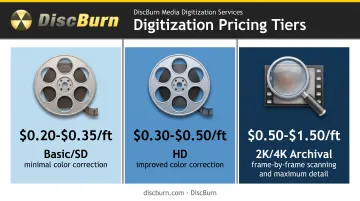
Pricing generally falls into three tiers based on resolution:
| Tier | Typical Price Per Foot | What You Get |
|---|---|---|
| Basic/SD | $0.20–$0.35 | Standard-definition scan, minimal correction |
| HD | $0.30–$0.50 | Sharper resolution, better color correction |
| 2K/4K Archival | $0.50–$1.50 | Frame-by-frame scanning, maximum detail |
For context, ScanCafe's published 8mm rate runs $0.34 per foot for HD full-frame scanning with color correction included, which lands right in the middle of that HD range.
These base prices typically cover scanning, basic cleaning, and limited-time digital access. They usually exclude restoration for damaged film, additional physical copies, and expedited shipping.
Basic/SD Transfer
Standard-definition transfers give you a digitized version of your film without much polish. Expect minimal color correction and a short window of online access before you need to download your files.
Best for: Casual home footage with lower sentimental stakes and tighter budgets.
HD Transfer
HD transfer sharpens image detail and improves color and contrast correction, with a longer access window than basic SD packages.
Best for: Most family archives where quality matters but full archival-grade scanning isn't necessary.
2K/4K Archival Transfer
This tier uses frame-by-frame scanning on sprocket-less machines built to handle shrunk, aging film without additional stress on the material. You get maximum detail retention at the highest price point.
Best for: Irreplaceable or historically significant footage, or anyone building a permanent family archive.
Hidden Fees & Extra Costs to Watch For
Base transfer pricing rarely tells the whole story. Watch for these add-ons:
- Shipping costs to send film to the provider (often not included)
- Digital download or extended access fees beyond a free trial window
- Extra output copies on DVD or USB, billed separately from the transfer itself
Once your film is digitized, many families order multiple DVD copies for relatives. DiscBurn duplicates those discs with full-color printed labels and packaging options such as custom sleeves, jewel cases, and retail-ready cases.
Key Factors That Affect the Cost of Digitizing 8mm Film
Pricing comes down to three buckets: technical factors (footage and resolution), film condition, and add-ons or output choices.
Film Length & Reel Size
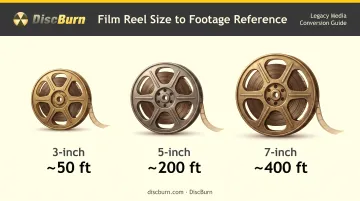
Most providers price per foot, so total footage drives total cost directly. Standard reel sizes give you a rough footage estimate before you even measure:
- 3-inch reel: approximately 50 feet
- 5-inch reel: approximately 200 feet
- 7-inch reel: approximately 400 feet
A shelf of ten 7-inch reels adds up fast at even $0.30 per foot, so tally your actual footage before assuming a quote is too high.
Film Condition & Age
Vinegar syndrome, mold, brittleness, and torn splices all require extra restoration work before scanning can even begin. Once vinegar syndrome starts, it accelerates on its own.
That said, the National Archives notes film can remain in reasonably good condition for decades if stored correctly. Cold, dry storage slows the chemistry but doesn't stop it forever.
Resolution & Transfer Quality
SD, HD, and 2K/4K scans scale in price because they scale in equipment complexity. Sprocket-less scanning matters most here: shrunk, decades-old film doesn't always fit standard sprocket rollers, and forcing it through can tear brittle stock. Archival-grade scanners avoid that risk entirely.
Additional Enhancements
A few common add-ons carry their own per-reel charges:
- Audio syncing (for reels with separate sound recordings)
- Color correction beyond basic auto-adjustment
- Frame stabilization for shaky or warped footage
Output & Storage Choice
Your chosen output format affects the total bill too. DVD, USB, cloud storage, or a combination all carry different costs.
The Library of Congress recommends three copies across two media types, with one stored off-site, refreshing files every 5–7 years for long-term safety. A DVD-plus-USB combo is a practical way to follow that guidance. DiscBurn can put finished transfers on DVD and custom USB drives when you want a second physical copy for redundancy.
DIY vs Professional 8mm Film Transfer: Which Costs Less?
This is the biggest cost-versus-value decision most people face once they start pricing out a transfer.
DIY: Equipment, Time, and Risk
A consumer digitizer alone typically runs $450 or more. Add software, memory cards, and blank discs, and you're realistically looking at:
- Film digitizer device: $450–$500
- DVD burning software: $30–$80
- Memory cards/storage: $20–$50
- Blank DVDs or USB drives: $20–$50
That's $500+ before you've digitized a single frame, and it doesn't include your time.
DIY transfer time roughly matches the real-time runtime of each reel. A collection of twenty 3-minute reels doesn't take an hour. It takes an afternoon of loading, monitoring, and unloading equipment, reel by reel.
Consumer digitizers generally use sprocket-based transport. That's fine for film in good shape, but decades-old, shrunk film can tear or jam in sprocket rollers. If that footage can't be replaced, the damage risk alone can erase any equipment savings.
Professional Transfer: What You're Paying For
Professional operations process film in bulk, which is why they can offer per-foot pricing that scales. Many use sprocketless systems built for brittle or shrunken film, and they usually bundle restoration, color correction, and quality checks into the rate.
DIY output is raw and unedited: whatever the camera captured is what you get. The higher professional per-foot rate reflects that finishing work, not just the scan itself.
Which Option Makes Sense for You
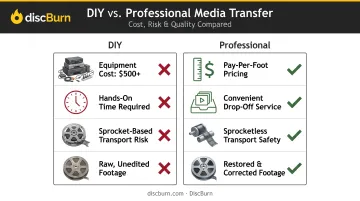
| Factor | DIY | Professional |
|---|---|---|
| Upfront cost | $500+ in gear | Pay per foot or reel |
| Your time | Hands-on, reel by reel | Drop off and wait |
| Film safety | Higher risk on old stock | Sprocketless transport |
| Output | Raw, unedited | Restored and corrected |
- Choose DIY if you have a small, undamaged collection and don't mind the hands-on time.
- Choose professional if your collection is large, historically valuable, or shows signs of damage.
For more than a handful of reels, professional transfer usually costs less once you count equipment, labor, and the risk of harming irreplaceable film.
Tips to Save Money & Common Mistakes to Avoid
A few adjustments can lower your final cost without sacrificing the footage that matters most.
Money-saving tips:
- Consolidate small, partially-filled reels before sending them in
- Do light dusting or cleaning yourself if the film is in decent shape
- Reserve 2K/4K scanning for your most valuable reels; use SD/HD for the rest
- Watch for seasonal bundle discounts, especially around holidays
Common mistakes to avoid:
- Comparing providers on per-foot price alone without adding restoration, audio sync, or copy fees
- Picking the cheapest unreviewed shop for irreplaceable family footage
- Skipping written quality guarantees and clear turnaround timelines
- Paying for full restoration on every reel when only a few need heavy work
Conclusion
The cost to digitize 8mm film to DVD depends on footage length, film condition, resolution choice, and whether you go DIY or professional. The right budget is the one that matches your collection's size and how much those reels mean to you.
Map those factors before you commit so you don't underbudget or settle for a lower resolution than you want. Once the film is digitized, DiscBurn can handle DVD duplication and custom packaging so every family member gets their own copy of the preserved footage.
Frequently Asked Questions
Where can I get 8mm film converted to digital?
Options range from DIY digitizers to retail transfer programs at stores like Walmart, plus dedicated film transfer specialists. Once your film is digitized, DiscBurn can handle affordable DVD duplication so every family member gets a copy.
How much does it cost to transfer 8mm film to digital?
Expect roughly $0.20–$1.50 per foot, depending on resolution and service level. A typical 50-foot reel might run $10–$25 for SD, or $25–$75 for HD or archival-grade transfers.
Can I convert 8mm film to DVD myself?
Yes, with a consumer digitizer device. It risks damaging brittle or shrunk reels and usually yields lower quality than a professional sprocket-less transfer.
How long does 8mm film to DVD transfer take?
DIY transfer takes roughly the real-time runtime of your footage, reel by reel. Professional services vary but often turn around orders within one to two weeks depending on volume.
Is it worth paying extra for HD or 4K film transfer?
For archival or deeply sentimental footage, yes. The extra cost preserves detail that SD scanning simply can't capture, especially on film that's already showing signs of age.
What's the best way to store digitized 8mm film — DVD, USB, or cloud?
None is perfect alone. Keep multiple copies across at least two media types, with one stored off-site, and refresh files every 5–7 years for the safest long-term protection.