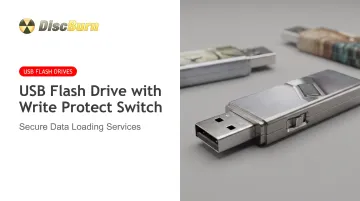
This is exactly the problem a hardware write protect switch solves. It's a physical slider on the drive itself that locks the device into read-only mode — no software, no drivers, no login required.
This guide covers what the switch actually is, how it works at the hardware level, why organizations rely on it, and what to check for before you buy in bulk.
Key Takeaways
- A hardware write-protect switch locks a USB drive read-only below the OS, blocking malware and accidental edits.
- It protects data integrity, not confidentiality: still encrypt sensitive content.
- Best fits: forensics, compliance training, kiosks, and archival records.
- Before bulk orders, verify USB version, switch quality, and NAND type.
What Is a USB Flash Drive with a Write Protect Switch?
A USB flash drive with a write protect switch has a physical toggle or slider built into its housing. Flip it one way, and the drive behaves normally: you can read, write, delete, and rename files. Flip it the other way, and the drive becomes read-only. Nothing can be added, changed, or erased until someone physically switches it back.
This is different from software-based protection like Windows registry tweaks, DiskPart commands, or macOS Finder permissions. Those methods operate inside the operating system, which means they can be undone by anyone with admin access — or bypassed entirely by malicious code running on the host machine. A hardware switch sits outside that layer entirely.
A recognizable example is the Kanguru FlashBlu30, a USB 3.0 drive available in 16GB, 32GB, and 64GB capacities with a physical read-only/read-write selector.
One real limitation: on most models the switch must be set before you connect the drive. Sliding it back to "unlock" restores write access, so the drive is protected only while locked—not permanently tamper-proof.
Write Protection Isn't Encryption
This distinction trips people up constantly. Write protection stops someone from changing what's on the drive. Encryption stops someone from reading it without a key. A locked drive full of unencrypted files is still fully readable by anyone who plugs it in — it just can't be altered.
When you're shopping for a write-protected drive, look for:
- A labeled "locked" and "unlocked" position (not just an unmarked slider)
- A distinct click or detent when you move the switch, not a mushy or ambiguous slide
- An activity LED that confirms the drive is being read or written to
How Does the Write Protect Switch Actually Work?
The switch itself is simple, but what it does behind the scenes varies by manufacturer. In most physical-switch products, moving the toggle signals the drive's controller chip (via a dedicated pin or a firmware flag) to reject incoming write commands. Read commands still pass through normally.
That differs from two other approaches you'll see marketed:
- Firmware-emulated switches: Read-only mode is enforced entirely in controller firmware, sometimes without a physical toggle at all. Some manufacturers now sell "switchless" locked drives this way.
- Software-only locks: Tools like Windows' DiskPart can set a drive's read-only attribute, but that's a host-side setting anyone with the right access can reverse in seconds.
What You Can and Can't Do While Locked
Once the switch is in the locked position:
- Opening files works normally. Recipients can view documents, run applications, or watch training videos.
- Copying files off the drive works. Nobody loses access to the content.
- Writing, deleting, or renaming is blocked. The OS throws a "write-protected" or "access denied" error on any attempt.
- Reformatting is blocked too. Even a well-meaning IT tech can't accidentally wipe it.
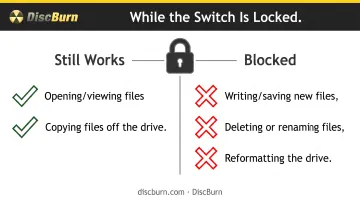
Most models require you to disconnect the drive, move the switch, and reconnect it to change modes — you generally can't flip it live while plugged in.
Where This Fits Into Compliance Frameworks
The finalized NIST SP 800-88 Revision 2 media sanitization guidelines focus on making data permanently inaccessible when media is retired. That is a different goal than write protection.
Hardware write protection is not a sanitization method. It is a preventive control that keeps data from being altered while the drive is still in active use.
For digital forensics specifically, the Scientific Working Group on Digital Evidence recommends protecting original evidence media with a software or hardware write blocker so investigators can examine content without risking accidental changes to the source. A hardware switch serves a similar function for any organization that needs to guarantee a file hasn't been touched since the day it was loaded.
Why Businesses and Organizations Rely on Write-Protected USB Drives
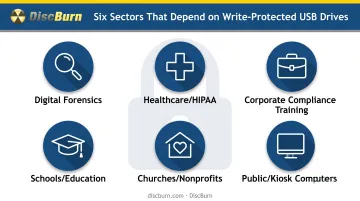
Write protection solves a narrow but persistent problem: keeping distributed files exactly as they were created, no matter what happens to the device afterward. That shows up across a surprising range of industries.
Common use cases include:
- Digital forensics: investigators need proof collected data hasn't changed since capture
- Firmware and regulatory distribution: manufacturers shipping unalterable updates or compliance packets
- Public and kiosk computers: libraries, trade shows, and shared workstations facing infected hosts
- HIPAA and GDPR workflows: healthcare and privacy teams distributing protocols that must stay unmodified
The Malware Angle
USB-borne threats aren't theoretical. Honeywell's 2025 industrial cybersecurity report found 1,826 unique USB threats in Q1 2025 alone, including 124 never seen before. That analysis covered more than 250 billion logs. USB malware detections had already jumped 33% in 2023 following a 700% year-over-year spike in 2022.
A write-protected drive doesn't stop malware from existing on an infected host, but it does stop that malware from rewriting or corrupting the drive's contents. Ransomware that encrypts or wipes files can't touch a locked drive at all.
Who Actually Needs This
The organizations that come up again and again are the same ones DiscBurn works with regularly:
- Corporate compliance and training teams distributing policy documents that must remain unaltered for legal review
- Healthcare providers sharing clinical protocols or patient education materials
- Schools distributing curriculum packets or exam materials
- Churches and nonprofits archiving sermon recordings or event media
There's also a straightforward archival case: contracts, wills, insurance records, and trade show handouts that need to remain provably unaltered for years. A locked drive gives you that assurance without relying on cloud storage or version history.
Hardware Switch vs. Software-Based Write Protection
The core trade-off comes down to universality versus flexibility.
| Feature | Hardware Switch | Software-Based Lock |
|---|---|---|
| Works without drivers | Yes | Sometimes |
| Cross-platform (Windows/macOS/Linux) | Yes, identically | Varies by tool |
| Reversible by end users | Only by physical access | Often, with basic permissions |
| Requires passwords or accounts | No | Sometimes |
| Vulnerable to malware override | No | Yes, in many cases |
A true hardware switch works the same way on a Windows laptop, a Mac, and a Linux workstation because it operates below the OS entirely: no driver installation needed.
Some newer products skip the switch altogether in favor of password-protected drives that default to read-only until a user authenticates. These add a layer of access control a simple switch doesn't have, but they also introduce password management overhead that many organizations distributing hundreds of drives would rather avoid.
The trade-off in plain terms: physical switches are "set and forget." No software to install, no credentials to manage, nothing that can be socially engineered. For bulk distribution to non-technical end users, that simplicity is usually the point.
What to Look for When Choosing a Write-Protected USB Drive
Not all write-protected drives are built the same. Before ordering in bulk, check these four things.
USB interface version. Choose USB 3.0 or newer. It still works in older USB 2.0 ports, and you keep faster transfers on newer hardware.
Switch quality. A flush, unlabeled slider is easy to bump accidentally or misread. Look for:
- Clearly labeled "lock" and "unlock" positions
- A firm click or detent when switching
- A visual or LED indicator showing current mode
NAND type and capacity. Higher-endurance NAND holds up better when drives are read hundreds of times over months or years, such as training libraries or reference materials left in circulation. Size capacity for your full file set plus a little headroom so you are not forced to compress files or split volumes.
The encryption gap. Write protection guards against unauthorized changes. It does not make the data confidential. If your content includes sensitive personal information or trade secrets, use an encrypted drive or encrypted files on top of write protection, not instead of it.
Need Custom, Write-Protected USB Drives in Bulk? How DiscBurn Can Help
DiscBurn produces custom-branded, data-loaded USB drives for schools, corporate compliance teams, healthcare providers, churches, and nonprofits—organizations that often need unalterable distribution media.
What that looks like in practice:
- 24-hour turnaround available on custom printed USB drives for time-sensitive rollouts
- Free data loading on 512MB custom printed drives
- Volume pricing on standard drives from a 100-unit minimum, with capacity to scale into large bulk orders
- Offline MD5 verification in an air-gapped environment, so your data is confirmed accurate before it ships
- Nationwide and worldwide shipping from the Minneapolis, MN headquarters
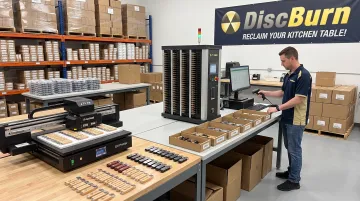
If you need write-protected drives specifically, DiscBurn can help with sourcing and NAND specs alongside custom USB printing, data loading, and CD/DVD/Blu-ray duplication.
Call 612-782-8200 to discuss capacity, switch options, and turnaround for your project.
Frequently Asked Questions
What is a USB flash drive with a write protect switch?
It's a drive with a physical toggle that locks it into read-only mode at the hardware level. Files can be read and copied, but nothing can be written, deleted, or changed while it's locked.
How do I know if the write protect switch is engaged?
Try saving or deleting a file. If the switch is on, your operating system will show a "write-protected" or "access denied" message immediately. No extra tools needed.
Is a write-protected USB drive the same as an encrypted drive?
No. Write protection prevents changes to existing files; encryption prevents anyone without a key from reading them at all. Many sensitive projects need both.
Can the write protection be bypassed or removed?
A true hardware switch has no software override. Someone needs physical access to flip it. If you see write errors while it's set to "unlocked," that usually points to firmware or physical damage, not a security bypass.
Do write-protected USB drives work across Windows, macOS, and Linux?
Yes. Because the protection happens below the operating system, it functions identically on all three without drivers or special configuration.
Can I order custom-branded, write-protected USB drives in bulk for my organization?
DiscBurn offers custom USB printing and data-loading services with fast turnaround and worldwide shipping. Call 612-782-8200 to discuss write-protected options for your order.