This shift raises real questions for musicians and collectors alike. How much music actually fits on a flash drive? Will it play in a car stereo? What does it cost to make your own?
The physical format isn't dead by any measure. US physical music revenue hit $2.015 billion in 2024, up 5.4% year over year, according to the RIAA's 2024 Year-End Revenue Report. USB albums are part of that story.
This guide covers the format's history, why artists love it, the most famous examples, the technical specs that matter, and exactly how to build your own.
Key Takeaways
- USB albums store lossless audio, video, and artwork together, unlike CDs.
- FAT32 works with car stereos, while exFAT handles large FLAC and video files.
- A 4GB drive holds 670-1,000 MP3s or 100-133 FLAC tracks, depending on bitrate.
- Independent artists keep more revenue selling USB albums than via streaming.
- Custom USB runs start small, with orders accepted from as few as 50 units.
What Are USB Music Albums?
A USB music album is exactly what it sounds like: a flash drive preloaded with digital audio files (MP3, WAV, or FLAC) instead of, or alongside, a physical CD. Some include bonus material like music videos, digital booklets, or exclusive artwork. Today, companies like DiscBurn produce a modern version of this format as USB Music Cards — credit-card-sized, custom-printed drives musicians can order alongside a traditional CD run.
The Format's Early Days
The concept traces back to 2006, when Keane released a limited memory-stick single through UK HMV stores. The drive held 512MB, cost roughly £4, and included audio, video, and screensaver content. Only 1,500 units were made.
By spring 2007, Emap was preparing a USB release of the "Kiss Does... Rave" compilation through HMV, distributed by Universal. The UK's Official Charts Company then made USB singles chart-eligible in August 2007, with full USB albums following that same year.
Why the Format Is Back
USB albums never fully disappeared, but interest has picked back up noticeably in recent years. A few forces are driving it:
- Collector culture: Vinyl's resurgence proved fans still want tangible objects tied to music
- Streaming fatigue: Owning a file feels different than renting access to one
- Merch differentiation: A branded, shaped drive stands out at a table full of t-shirts and stickers
- Gadget appeal: Younger listeners who grew up on phones and laptops connect more naturally with a flash drive than a disc
Why Musicians and Fans Love USB Albums
The appeal isn't nostalgia; USB drives solve practical problems CDs and vinyl never could.
Storage and Durability That Outlast Physical Formats
A single USB drive can hold high-resolution FLAC or WAV files, full music videos, digital liner notes, and bonus tracks, all on one piece of hardware. A CD caps out around 700MB and only plays audio. There's no contest.
Flash drives don't scratch, and they don't warp in a hot car. They plug into computers, most modern car stereos, and even some TVs without a separate player. Try doing that with a CD that's been sitting on a dashboard all summer.
Collectible Value and Revenue Control
Shape and design turn a drive into a collectible on its own:
- Radiohead's bear-head drive holding their full Parlophone catalog
- Bon Jovi's Greatest Hits collection, released in a custom USB edition
- Queen's gold Orb Gift Box, paired with a plated pendant necklace
Independent artists selling USB albums directly at shows or through their own site keep the margin streaming platforms would otherwise take. There's no algorithm deciding who sees the release; it's a direct transaction between artist and fan.
Bundling audio, video, artwork, and liner notes into a single drive creates a richer product than any single format could offer alone. That's the real reason labels kept experimenting with USB releases even as streaming grew.
Iconic USB Album Releases Worth Knowing
A handful of releases turned USB albums from a novelty into a legitimate collector's category.
| Artist | Release Details |
|---|---|
| The Beatles | Apple-shaped drive with the full remastered catalog, released in 2009. Billboard reported a 16GB capacity, $279.99 price, and 30,000-unit run for the North American release |
| Radiohead | Bear-shaped 4GB drive containing their complete Parlophone catalog in WAV format, sold through Radioheadstore starting December 2007 |
| Queen | Gold "Orb Gift Box" combining a USB with 15 remastered studio albums, photo gallery, and a gold-plated pendant necklace, limited to 5,000 copies for their 40th anniversary |
| Bob Dylan | Harmonica-shaped drive holding 35 studio albums, six live albums, and rare material, released in 2013 through Legacy Recordings |
| Lady Gaga | Limited USB edition of The Fame Monster including album tracks, remixes, music videos, and digital artwork |
Universal Music Group also pushed early USB releases in the UK throughout 2006 and 2007, using the format to test how physical retail could adapt to digital files. Those early tests set the template that Radiohead, Queen, and Dylan later refined into full-scale collector releases.
Technical Specs: Storage, File Systems, and Format Explained
Before ordering (or building) a USB album, the technical details determine whether it actually works the way you expect.
How Much Music Actually Fits
Song counts depend heavily on file format and bitrate. Using average file sizes of 4-6MB for MP3 and 30-40MB for FLAC:
| Drive Capacity | MP3 (approx.) | FLAC (approx.) |
|---|---|---|
| 4GB | 670-1,000 songs | 100-133 songs |
| 8GB | 1,330-2,000 songs | 200-267 songs |
| 16GB | 2,670-4,000 songs | 400-533 songs |
| 32GB | 5,330-8,000 songs | 800-1,067 songs |
| 64GB | 10,670-16,000 songs | 1,600-2,133 songs |
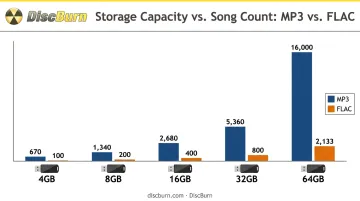
These are estimates before accounting for formatting overhead or bonus content like videos and artwork.
Choosing the Right File System
This decision affects whether fans can actually play the drive in their car.
- FAT32: The safest choice for broad compatibility, including older car stereos, but capped at a 4GB maximum file size per Microsoft's file system documentation
- exFAT: Necessary for large lossless files or bundled video content that exceeds FAT32's limit, though not every car stereo supports it
- NTFS: Handles large files well but shouldn't be assumed to work in car audio systems without checking the specific model
MP3 vs. WAV vs. FLAC
Each format makes a different trade-off:
- MP3: Compressed and lossy, but the smallest files, maximizing how many tracks fit
- FLAC: Lossless compression that keeps full audio quality in a smaller footprint than WAV
- WAV: Typically uncompressed, delivering the largest files but preserving every bit of source audio
Bitrate matters too. A 320kbps MP3 takes noticeably more space than a 128kbps version of the same song, which directly changes how many tracks and bonus files fit on a given drive.
Before mass production, test playback across every intended device. Professional duplication services can pre-load and verify files at scale, catching compatibility issues before hundreds of drives ship out.
How to Create Your Own Custom USB Music Album
Building a USB album isn't complicated, but a few decisions early on save headaches later.
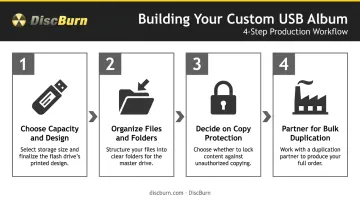
- Pick a capacity and design that match your content plan. A straight MP3 album fits comfortably on 512MB to 2GB. Lossless files or bonus videos will need extra room, while a shaped or branded drive adds real collectible appeal.
- Organize files with a clear folder structure. Consistent naming (track number, artist, title) prevents playback issues across different devices.
- Decide on copy protection. Open distribution works for promotional giveaways; encrypted or watermarked files suit exclusive fan-club releases.
- Partner with a duplication service for bulk production. Quality control at scale is difficult to replicate using nothing more than a home computer and a stack of drives.
What This Looks Like in Practice
DiscBurn, a Minneapolis-based media production company, runs custom USB projects for independent musicians through its USB Music Card, a credit-card-shaped drive built specifically for merch tables, with a few specifics worth knowing:
- Minimum order of just 50 units, compared to 100 units for standard stick-style drives
- Available in 512MB, 2GB, and 4GB, with pricing starting around $3.00 per unit at 500+ quantities
- 24-hour turnaround covers both printing and data loading, useful for artists prepping merch before a weekend show
- Every drive goes through offline MD5 verification, confirming the loaded files match the original master before shipping
Connector choice matters too. Standard USB Type-A remains the safest bet for car stereos and older laptops, while USB-C suits an audience running newer devices. Services offering all three connector types (including Micro USB) let artists match the drive to their actual fan base instead of guessing.
Frequently Asked Questions
Where can I get music for USB?
Artists can load their own files directly onto a blank drive, or fans can find preloaded USB albums through artist websites, band merch stores, and specialty duplication services that handle bulk production.
What is the best USB file system for storing music?
FAT32 offers the broadest compatibility with car stereos and older devices. exFAT is better suited for large lossless files or albums bundled with video content.
How many songs will a 32GB flash drive hold?
Roughly 5,330 to 8,000 songs at typical MP3 bitrates, or around 800 to 1,067 tracks if using lossless FLAC files. Exact numbers shift based on bitrate and song length.
Can USB music albums be played in a car stereo?
Most modern car stereos with a USB port support flash drive playback, as long as the drive uses a widely compatible file system like FAT32. Always check the stereo's specifications for exFAT or NTFS support before assuming it works.
How much does it cost to create a custom USB music album?
Costs depend on drive capacity, design customization, and order quantity. Providers like DiscBurn use tiered volume pricing with a 100-unit minimum order (just 50 units for credit-card-style USB Music Cards), so per-unit cost drops noticeably as order size increases.
Are USB albums better than CDs for distributing music?
USB drives win on storage capacity, durability, and multimedia potential like bundled video and artwork. CDs still win on upfront cost and universal playback across older devices that lack a USB port.