But SD is actually a family of formats, not a single product. SD, SDHC, SDXC, and now SDUC each cover a different capacity range and use a different file system under the hood. These tiers exist because devices, cameras, and file sizes have grown enormously since the original SD card launched, and one format simply couldn't stretch to cover a 2MB MP3 file and a 90-minute 8K video project at the same time.
This guide breaks down each SD card type, explains how they differ, and helps you match the right one to your camera, phone, drone, dashcam, or business project.
Key Takeaways
- SD, SDHC, SDXC, and SDUC are one family, split by maximum capacity and file system.
- SDHC (up to 32GB) and SDXC (up to 2TB) cover most devices in use today.
- Compatibility is one-way: newer devices read older cards; older devices often cannot.
- Choose by device support, file size, and write speed—not the biggest number on the package.
What Is an SD Memory Card and Why Do the Types Matter?
An SD (Secure Digital) card is a small, removable flash storage device used in cameras, phones, drones, dashcams, and laptops to store photos, video, and audio.
It's the card you pop out of a camera and slide into a laptop when you need to offload a full shoot of vacation photos.
The labels SD, SDHC, SDXC, and SDUC aren't marketing terms. They're capacity tiers within the same physical card family, and each one ties to a specific maximum storage size, a required file system, and often a different speed capability.
Skip past this distinction and you risk:
- Buying a card your device physically can't read
- Formatting a card with the wrong file system and losing performance
- Underestimating the write speed needed for smooth 4K or 8K recording
Knowing which tier you're shopping for saves a return trip to the store—or a corrupted recording session.
Types of SD Memory Cards
SD cards are grouped by capacity and file system, not by brand or price point. Each tier arrived as storage needs and device technology pushed past the limits of the one before it. According to the SD Association's capacity standards, the four tiers break down like this:
| Format | Capacity range | File system |
|---|---|---|
| SD (SDSC) | Up to 2GB | FAT12/FAT16 |
| SDHC | Over 2GB to 32GB | FAT32 |
| SDXC | Over 32GB to 2TB | exFAT |
| SDUC | Over 2TB to 128TB | exFAT |
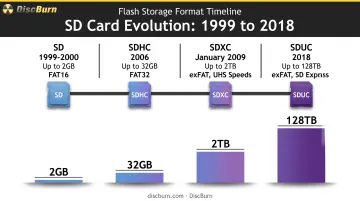
Picking among them comes down to three questions: what capacity do you actually need, what file system does your device expect, and how fast does the card need to write data.
Standard SD (SDSC) Cards
SDSC is the original SD format, built on the FAT16 file system and running on the basic Default Speed and High Speed bus modes. It's the card that started the whole family, dating back to 1999-2000.
- Capacity ceiling: 2GB, the lowest in the family by a wide margin
- Best suited for: legacy devices, older card readers, and vintage digital cameras or MP3 players that predate SDHC support
- Key strength: near-universal backward compatibility, since virtually every SD-capable device can read it
- Trade-off: 2GB simply isn't enough for modern photos, HD or 4K video, or app data, and new SDSC cards are increasingly hard to find
Unless you're reviving an old camera, this format has aged out of practical use.
SDHC (Secure Digital High Capacity)
SDHC upgraded the format to FAT32, stretching capacity from over 2GB to 32GB and introducing Speed Class ratings alongside a faster high-speed bus mode. It arrived in 2006 and quickly became the everyday standard.
The catch: because SDHC uses FAT32 instead of FAT16, it requires a host device that specifically supports SDHC. An older SD-only slot won't recognize it.
- Best suited for: point-and-shoot cameras, dashcams, action cameras, handheld gaming devices, and everyday smartphones or tablets
- Key strength: affordable, widely stocked, and plenty for standard-definition through HD video and typical photo libraries
- Trade-off: the 32GB cap becomes limiting fast if you're shooting 4K/8K footage, running large app libraries, or recording long stretches without swapping cards
SDXC (Secure Digital Extended Capacity)
SDXC jumped the ceiling dramatically, supporting over 32GB up to 2TB and switching to the exFAT file system by default. Launched in January 2009, it also introduced UHS (Ultra High Speed) bus modes.
This matters because exFAT removes the 4GB single-file size limit that FAT32 imposes, which is exactly the problem long 4K or RAW video files run into. SDXC cards also unlock UHS-I and UHS-II speeds, with the fastest specifications reaching up to 300MB/s read speeds in real products.
- Best suited for: DSLR/mirrorless cameras, drones, 4K and 8K video production, laptops handling large media files, and gaming consoles
- Key strength: the combination of high capacity and high speed makes it the default choice for serious content creation
- Trade-off: requires an SDXC-compatible or exFAT-aware host device; it simply won't work in a strictly SD/SDHC-only slot
SDUC (Secure Digital Ultra Capacity)
SDUC is the newest, highest-capacity tier, announced in 2018 as resolution and data demands kept climbing. It supports capacities up to 128TB, with associated SD Express speeds reaching up to 985MB/s in early specifications (later revisions push that even higher).
- Best suited for: high-resolution professional video production, large-scale data logging, and emerging imaging workflows
- Key strength: headroom far beyond current consumer and prosumer needs, with SD Express bandwidth built for next-wave media workloads
- Trade-off: very limited device support today, higher cost, and genuinely scarce availability at retail even for multi-terabyte capacities
For nearly everyone reading this, SDUC is a format to watch rather than one to buy right now.
How to Choose the Right SD Card for Your Needs
The best card isn't the biggest or fastest one on the shelf. It's the one your specific device supports and your workload actually demands.
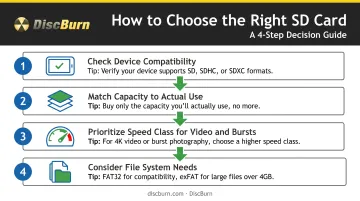
Check Device Compatibility First
Look for SD, SDHC, SDXC, or SDUC logos on the device itself or in its manual. Compatibility only works one direction, as the SD Association's compatibility matrix confirms:
- SD-only slots read SD cards
- SDHC slots read SD and SDHC
- SDXC slots read SD, SDHC, and SDXC
- SDUC slots read all four formats
A card physically fitting the slot doesn't guarantee it'll work. Confirm firmware and logo support before buying.
Match Capacity to Actual Use
Estimate what you're storing. Photos take up far less room than 4K or 8K video, and your offload habits matter too. A shooter who dumps footage nightly needs less capacity than one filming multi-day trips with no laptop in sight.
Prioritize Speed Class for Video and Burst Shooting
Speed Class, UHS Speed Class, and Video Speed Class ratings indicate the minimum sustained write speed a card guarantees, which is what actually prevents dropped frames during 4K/8K recording or long burst-photo sequences. Per the SD Association's Speed Class definitions, V60 and V90 ratings require UHS-II mode or faster.
Consider File System Needs
exFAT (used by SDXC and SDUC) handles large individual files far better than FAT32 (used by SDHC), which caps single files at 4GB. That matters directly if you're editing high-bitrate video files straight off the card.
For Bulk or Preloaded Business Cards
Businesses distributing training content, marketing materials, or product data on SD cards at scale face a different challenge entirely: sourcing, loading, and labeling dozens or hundreds of identical cards without errors creeping in.
DiscBurn's flash-card duplication service handles this end to end. It supports SD, MiniSD, Micro SD, and Compact Flash in capacities from 1GB through 16GB, plus custom sizes on request.
What you get:
- Pricing from $15 per unit (card included from 4GB and up)
- Custom labeling and data loading on every order
- Verified loads before shipment
- About 3 business days standard turnaround
That mix suits corporate trainers, schools, churches, and retail teams that need identical, ready-to-use cards without loading each one by hand.
Common Mistakes to Avoid When Buying SD Cards
A few recurring errors trip up SD card buyers. Most are easy to sidestep once you know what to check.
- Assuming any SD card works in any device. An SDXC card dropped into an SD/SDHC-only slot simply won't be recognized, no matter how well it fits physically.
- Ignoring speed ratings. A high-capacity card with a low speed class will bottleneck video recording and cause dropped frames, even when capacity isn't the issue.
- Formatting on the wrong system. Reformatting with a generic OS utility instead of the SD Association's official SD Memory Card Formatter can hurt performance and long-term reliability.
Conclusion
SD, SDHC, SDXC, and SDUC form one card family, but they're distinguished by real, practical differences in capacity, file system, and speed capability. Buy based on the specs and skip the marketing hype around raw numbers.
Match the card type to your device's compatibility and your real data needs, rather than chasing the biggest capacity on the shelf. That choice prevents wasted money and storage headaches later.
As devices and content resolutions keep climbing, understanding these tiers keeps your storage decisions from going outdated in a year or two.
Frequently Asked Questions
What is the difference between SD and SDHC flash memory cards?
Standard SD cards max out at 2GB using FAT16, while SDHC cards support 4GB to 32GB using FAT32. You'll need an SDHC-compatible device to read the newer format.
What is an SDHC flash memory card used for?
SDHC cards are commonly used to expand storage in digital cameras, camcorders, smartphones, tablets, and handheld gaming devices for photos, HD video, and music libraries.
Where can I buy SDHC flash memory cards?
They're widely available at electronics retailers and online marketplaces. For bulk business orders or custom preloaded cards, DiscBurn's SD card duplication service sources the cards, loads your data, and adds custom labeling in one order.
Can I use an SDXC card in a device that only supports SDHC?
Generally, no. SDHC devices can't read SDXC cards due to the exFAT file system and capacity differences, so check your device's specs before buying.
What speed class do I need for 4K or 8K video recording?
Look for UHS Speed Class 3 (U3) or Video Speed Class V60/V90 ratings. These guarantee the sustained write speed needed to avoid dropped frames during high-resolution recording.
How do I know what type of SD card my device supports?
Check the device manual or look for SD, SDHC, SDXC, or SDUC logos near the card slot. Remember, backward compatibility runs newer-to-older only, never the reverse.