Deciding who handles that conversion, an internal team or an outside vendor, isn't a minor logistics question. It shapes your budget, your timeline, your quality control, and in regulated industries, your compliance exposure.
The stakes are real. In AIIM's State of Intelligent Information Management survey, 23% of respondents described their paper records as "chaotic" or "somewhat unmanaged," and 86% pointed to failure to digitize and standardize business inputs as a major transformation bottleneck. This article breaks down when in-house digitization makes sense, when outsourcing wins, and how many organizations blend both.
Key Takeaways
- In-house keeps capture and conversion on your staff and gear; outsourcing hands that work—and often distribution—to a vendor.
- Control and institutional knowledge favor in-house; speed, scale, and professional equipment favor outsourcing.
- Volume, budget, timeline, data sensitivity, and distribution needs should drive your decision.
- Hybrid approaches are common: keep sensitive or small batches in-house; outsource bulk capture and distribution.
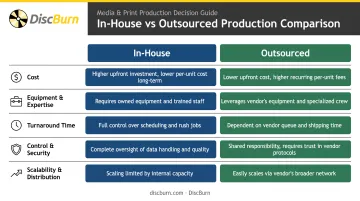
In-House vs. Outsourced Digitization: Quick Comparison
Cost
In-house digitization looks cheap until you count everything: scanners, software licenses, staff training, and the labor hours spent on prep and quality control. It only pencils out at very small scale.
Outsourced pricing is usually flat and per-unit. DiscBurn's basic duplication packages, for example, drop from $1.95 per CD at 50 units to $0.65 per CD at 1,000 units, with DVDs following a similar curve down to $0.75 each at the same volume.
Equipment & Expertise Required
- In-house: Requires purchasing and maintaining scanners or duplicators, plus training staff on capture settings and QC standards.
- Outsourced: Vendors supply the hardware and trained operators. DiscBurn, for instance, runs Rimage Everest thermal printers at 170 lpi for duplication and offset or silk-screen printing up to 175 lpi for replication.
Turnaround Time
In-house projects compete with staff's other responsibilities, so timelines stretch. Outsourced production runs on dedicated capacity instead.
Standard turnaround for disc duplication is typically 3–5 business days, with sleeved packaging running closer to 7 days. USB drives usually ship in 3 business days, and select products qualify for 24-hour rush production.
Control & Security
Full internal custody appeals to organizations handling sensitive records. Outsourcing doesn't mean losing control if you vet the vendor properly. Look for:
- Offline verification protocols (such as air-gapped MD5 checks during data loading)
- Documented chain-of-custody for physical media handling
- Secure destruction options with confirmation-of-destruction paperwork
Scalability & Distribution
In-house teams generally struggle past a few hundred or thousand items without adding staff. Outsourced partners are built for range. DiscBurn handles orders anywhere from 10 units to over 10 million discs, bundling duplication, printing, and packaging into one production flow.
What Is In-House Digitization?
In-house digitization means capturing images, audio, or video using equipment, software, and staff your organization already owns and employs. It appeals to organizations with recurring digitization needs, or with materials too sensitive to hand off.
Core benefits include:
- Retained institutional knowledge about your own records and formats
- Full physical control over materials at every stage
- Flexibility to adjust specifications mid-project without renegotiating a contract
Not every in-house effort looks the same. Some organizations build a dedicated internal scanning department; others rely on ad-hoc use of office scanners or cameras for occasional small projects.
When In-House Digitization Makes Sense
In-house work fits best for one-off or small-batch jobs, highly confidential records, or organizations building long-term internal capacity. Legal offices, government agencies, and institutions handling regulated data are common examples — the sensitivity of the material often outweighs the convenience of outsourcing.
Even when the use case fits, true cost is easy to underestimate. The National Archives' Federal Records Management Council breaks digitization into far more than scanning time: preparation, indexing, OCR, and quality control each carry separate labor rates. Its sample pricing shows document prep running $25–$35 per hour, QA specialists at $35–$55 per hour, and program management as high as $130 per hour.
Organizations that budget only for scanner time, and skip the prep, indexing, and QC workstreams, routinely underestimate the true cost of going it alone.
What Is Outsourced Digitization?
Outsourced digitization means contracting a specialized vendor to capture, convert, and often distribute content on physical media. It suits organizations that need speed, scale, or professional-grade output without building that capability themselves.
Core benefits include:
- No capital outlay for scanners, duplicators, or disc printers
- Faster turnaround from dedicated production capacity
- Staff time freed up for other work
- Consistent quality standards across every unit produced
Some vendors offer pure scan-and-deliver services. Others, like DiscBurn, operate as full-service partners: combining content mastering and authoring, disc and USB duplication, custom printing, packaging design, and worldwide shipping under one roof.
Use Cases of Outsourced Digitization
Outsourcing dominates where volume or distribution requirements exceed what an internal team can realistically handle. Churches, schools, hospitals, and corporate compliance or training programs are frequent clients.
DiscBurn's own customer base includes organizations like Oaks Church in Eagan, Minnesota, Tonda Elementary, and Ivinson Memorial Hospital, with orders ranging from small runs into the millions.
A common example: serialized disc printing. Compliance and corporate training programs often need trackable, individually numbered copies for distribution and auditing. DiscBurn supports this directly, with training and educational disc packages priced from roughly $0.65 to $0.75 per unit at 1,000-unit volumes. That turns a labor-intensive DIY process into a per-item line item that's easy to budget.
For organizations still doing this manually, the practical case for switching often comes down to predictability: instead of guessing at internal labor costs, you get a fixed per-unit price and a fixed delivery date.
Real-World Example: Choosing the Right Digitization Approach
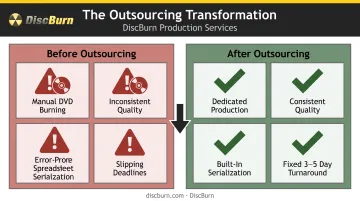
Picture a mid-sized healthcare system rolling out an annual compliance training refresh. Initially, the training team tries to handle everything internally: burning DVDs on office computers, printing labels by hand, and mailing sets to a dozen regional facilities.
The problems show up fast:
- Staff time gets eaten up by disc burning instead of training development
- Quality varies from batch to batch, with some discs failing to play
- Serialization for audit tracking is done manually in a spreadsheet, prone to errors
- Deadlines slip as facility count grows
The trigger to switch is rarely a single failure. More often, volume and compliance tracking outgrow what a training coordinator can manage between other duties. That's when organizations start looking at partners who already handle serialized, trackable disc production at scale.
Once outsourced, the math changes. A vendor producing training discs at $0.65–$0.75 per unit with 3–5 business day standard turnaround replaces an open-ended internal process with a fixed cost and a fixed delivery window — plus serialization built into the print run instead of tracked by hand.
The takeaway: Outsourcing made sense here once volume and compliance requirements outgrew internal capacity, not before. If your organization is facing a similar bulk digitization or distribution challenge, DiscBurn's duplication and printing services can handle the serialized production and turnaround that in-house teams often can't sustain.
Conclusion: Which Approach Wins?
There's no universal winner. The right call depends on five factors:
- Project volume
- Budget
- Timeline
- How sensitive the material is
- Whether physical distribution (DVDs, USB drives, serialized copies) is part of the goal
Small, one-off, or highly confidential projects usually favor keeping work in-house. You retain full custody and can adjust on the fly.
Once volume climbs, deadlines tighten, or distribution becomes part of the deliverable, outsourcing is usually the more practical path. It trades capital investment for predictable per-unit pricing, professional equipment, and fixed turnaround—consistency compliance-driven programs depend on.
Weigh your needs against these factors before committing either way, and don't rule out a hybrid model that uses both. If outsourcing fits, DiscBurn handles media digitization, CD/DVD/Blu-ray duplication, and custom USB loading from Minneapolis, with standard turnaround in 3–7 business days.
Frequently Asked Questions
How much does it cost to digitize?
Cost varies by volume, material type, and whether you use in-house equipment or a vendor. Outsourced disc duplication typically runs from around $0.65 to $2.20 per unit depending on quantity, while custom USB drives range roughly $3.50 to $5.75 each.
Is outsourcing illegal in the US?
No. Outsourcing is a common, legal business practice. The U.S. Chamber of Commerce treats it as standard for functions like manufacturing, HR, and shipping. Regulated industries handling health data must ensure vendors meet HIPAA business associate requirements before sharing protected information.
What are the four types of outsourcing?
One common classification breaks outsourcing into business process, manufacturing, professional, and project outsourcing. Media digitization and duplication services generally fall under professional or project outsourcing, depending on scope and duration.
How long does outsourced digitization typically take?
Turnaround depends on volume and format. Standard disc duplication typically runs 3–5 business days, with sleeved packaging closer to 7 days. USB drives average around 3 business days, and 24-hour rush options are available on select products.
Can I combine in-house and outsourced digitization for the same project?
Yes, and it's often the ideal approach. Many organizations handle small or sensitive batches internally while outsourcing bulk conversion, duplication, and distribution-heavy work to a specialized vendor.
What should I ask a digitization vendor before signing a contract?
Before you sign, confirm:
- Supported file formats and verification practices (such as offline MD5 checks)
- Standard versus rush turnaround times
- Flexibility across order volumes
- Chain-of-custody procedures for sensitive or regulated records