Introduction
Type "disc copy" or "disk cloning" into Google in 2026, and you'll get a mess of results that blur two completely different technologies together. That confusion costs people time and, sometimes, money.
Here's the real split: someone wants to back up a wedding DVD or an old PC game. Someone else runs a hospital training department and needs 5,000 branded discs shipped out by Friday. Same search terms, wildly different problems.
This guide untangles disc copying from disk cloning, walks through the legal boundaries, and covers the DIY process step by step. You'll also see exactly when a bulk duplication partner makes more sense than burning discs one at a time in your home office.
Key Takeaways
- Disc copying duplicates CDs, DVDs, and Blu-rays; disk cloning copies entire hard drives—two different jobs
- Personal backups of discs you own are typically legal—reselling copies of games or commercial software is not
- Windows 11 has no built-in disk cloning tool; true drive-to-drive clones need third-party software
- DIY burning suits a handful of copies. Orders of 100+ discs need professional duplication and retail-ready packaging
- Physical media still matters in 2026 for compliance training, healthcare records, and offline archives
Disc Copying vs Disk Cloning: Understanding the Difference
The words "disc" and "disk" get used interchangeably online, but they're not the same thing. That overlap is exactly why search results get muddled.
Disc copying means duplicating content from optical media, CD, DVD, or Blu-ray, onto another disc or into a disc image file. It's either a full sector-by-sector copy or a file-based copy that grabs only selected content.
Disk cloning means creating a bit-for-bit replica of an entire hard drive or SSD, including the operating system, partition structure, and boot records. IT professionals use this for drive upgrades, computer migrations, and forensic imaging.
Where the Confusion Comes From
Historically, "disc" referred to optical media and "disk" referred to magnetic or solid-state storage. That distinction still holds in technical documentation. Casual search behavior doesn't respect it, which is why results stay tangled.
Different Tools for Different Jobs
Here's how the use cases actually break down:
| Task | Technology | Typical User |
|---|---|---|
| Backing up a music CD | Disc copying | Consumer |
| Distributing training videos | Disc duplication | Business/nonprofit |
| Upgrading a laptop's SSD | Disk cloning | IT professional |
| Forensic drive imaging | Disk cloning | Legal/law enforcement |
Despite predictions that cloud storage would make physical media obsolete, industries like healthcare, legal, and education still lean on discs for compliance and offline distribution. Those use cases are why optical media still shows up in 2026 workflows.
How to Copy a CD, DVD, or Blu-ray Disc
There are two core methods, and picking the wrong one is the most common mistake DIY users make.
Sector-by-sector copying duplicates every bit of data on the disc, including hidden or protected sectors. This is what you need for game discs or software installers. File-based copying only copies the visible files and folders. It's simpler, but it won't preserve copy protection or unusual disc structures.
The Basic Consumer Workflow
- Select your source and destination drives: if your computer has more than one optical drive, choose which one reads and which one writes
- Pick your copy method: sector-by-sector for software/games, file-based for music or data discs
- Start the burn and let the software create the write session
- Run "verify written data" to confirm the burned copy matches your source
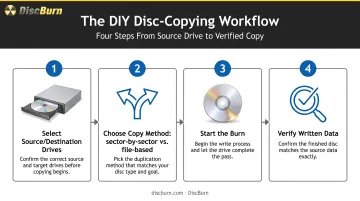
That verification step matters, but don't over-trust it. It compares the newly written disc against the burn image. It doesn't confirm the original source was read correctly in the first place. A bad read can be copied perfectly and still pass verification.
Why This Doesn't Scale
Burning discs one at a time works fine for five copies. Burning 50 is a different story. Each disc needs its own recording cycle, loading, unloading, and verification pass.
That's realistically 10 to 20 discs before DIY burning stops being practical, both in time and in consistent quality. Past that threshold, a bulk duplication service like DiscBurn is the practical next step.
Disk Cloning in 2026: Software and Windows 11 Native Options
If you need bulk disc duplication for training kits or promotional discs, stop here. Disk cloning is for hard drive migrations and IT backups, not optical media. Skip ahead to the DIY vs. Professional section for disc copying.
For everyone actually asking about hard drives: Windows 11 does not include native disk cloning software. Microsoft's own documentation covers Windows Backup and File History, both of which handle files, settings, and app data. Neither creates a true bit-for-bit clone of a drive.
What Windows 11 actually offers:
- Windows Backup: saves files, themes, settings, and installed-app records for restoration on a new PC
- File History: continuously saves versions of personal files to an external drive
Neither option copies boot records, free space, or partition structure the way a real clone does.
Third-party tools are still required for genuine drive-to-drive cloning. Free and paid options both work; choose based on drive size and whether the destination disk is larger or smaller than the source.
Is It Legal to Copy a Disc? Game Discs, Movies, and Copyright Rules
This is where things get genuinely tricky, and "it's for personal use" isn't the blanket defense a lot of people assume it is.
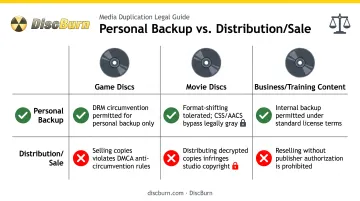
The general principle: making a backup of media you legally own often counts as acceptable use. Distributing, selling, or sharing that copy is not: that's straightforward copyright infringement.
But there's no universal legal right to back up any disc. U.S. copyright law specifically protects owners of computer program copies, not music or films broadly.
Whether a personal copy qualifies as fair use depends on four factors courts weigh case by case. There's no fixed number of copies or percentage that's automatically "safe," according to the U.S. Copyright Office's Fair Use Index.
Can You Copy a Game Disc?
Technically, yes: sector-by-sector copying tools can do it. Legally, it's murkier:
- Most game discs carry DRM or copy protection
- Copying beyond a personal backup breaches licensing terms
- Bypassing encryption or access controls can trigger DMCA anti-circumvention rules
- PlayStation and Nintendo's user agreements explicitly prohibit unauthorized copying and bypassing security measures
Fair use and DMCA circumvention are two separate legal questions. Having a fair-use argument for making a copy doesn't automatically give you permission to break through encryption to make it.
Can You Copy a Movie Disc?
Personal backups of DVDs or Blu-rays you own sit in a gray area. Commercial releases almost always use CSS or AACS encryption, so ripping them usually means circumventing DRM—a DMCA issue even if you never share the file. Selling or posting copies is clear infringement.
What This Means for Businesses
Those same lines matter more when you're duplicating at scale. If you're producing training videos, sermons, or proprietary software for distribution, the rule is simple: only duplicate content you own or are licensed to distribute. Legitimate duplication partners reproduce original music, owned training materials, and licensed software, never pirated commercial media.
If compliance training includes third-party clips, footage, or licensed content, check the licensing agreement or talk to counsel before mass-producing discs. It's a lot cheaper to ask upfront than to recall 5,000 units later.
DIY vs Professional Bulk Disc Duplication: When to Call in Experts
Once your disc needs go past a few dozen units, the math shifts fast.
DIY burning works for small batches, but it's serial: each disc gets its own burn cycle, with no packaging, printing, or quality consistency across units. It usually tops out around 10 to 20 discs before the time cost outweighs the savings.
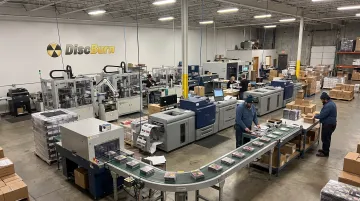
Professional duplication uses automated equipment to burn data onto pre-made discs in continuous runs. You get consistent quality at scale, plus retail-ready packaging.
Call a duplication partner when you need any of the following:
- More than a couple dozen discs on a real deadline
- On-disc printing, serialization, or matched packaging
- Uniform quality across departments, campuses, or client kits
- Mixed deliverables (disc plus USB or flash card) from one vendor
Duplication vs. Replication
These terms get confused constantly, but they're distinct processes:
- Duplication: Burns your content onto pre-manufactured recordable discs; best for small-to-mid runs, typically under a few thousand units
- Replication: Presses data into discs during manufacturing; built for very high-volume, full-color retail runs
A Real-World Example: How DiscBurn Handles Bulk Orders
DiscBurn in Minneapolis runs integrated disc manufacturing for the range between DIY burns and enterprise replication. Their operation covers:
- CD, DVD, and Blu-ray duplication and replication from 10 discs to over 10 million
- Photorealistic thermal printing at 170 lpi on duplicated discs
- Offset (175 lpi) and silk-screen (120 lpi) replication print, with Pantone matching
- Custom packaging: jewel cases, sleeves, inserts, and multi-disc Blu-ray box-set cases
- Serialized disc printing for corporate compliance training kits
- 3–5 business day standard turnaround on most CD/DVD packages, with rush options and worldwide shipping
At 1,000 units, full-color CDs run $0.65 each and DVDs $0.75 each. That undercuts DIY once you add blank media, printer ink, and labor at the same volume.
Who Actually Needs This
Bulk duplication shows up constantly in a handful of specific scenarios:
- Corporate compliance training: serialized discs across departments or locations
- Church sermon archives: clients such as Oaks Church in Eagan, MN
- Hospital training materials: Ivinson Memorial Hospital is one documented example
- School and nonprofit distribution: Tonda Elementary is another real client case
Beyond Optical Discs
Physical media in 2026 isn't limited to discs. Many duplication partners, DiscBurn included, offer custom USB flash drive printing (100-unit minimum, 512MB to 128GB) and SD/Micro SD/Compact Flash card duplication starting at $15 per card.
Organizations often mix formats. A compliance kit might ship as a printed DVD and a bootable USB, depending on what end-user hardware supports.
Physical media isn't disappearing. Market research estimates the duplication-disc market at $1.18 billion in 2024, growing to roughly $1.45 billion by 2030, driven largely by healthcare, legal, and education sectors that still need tangible, offline deliverables.
Frequently Asked Questions
Does Windows 11 have disk cloning software?
No. Windows 11 includes Backup and Restore and File History for data backup, but neither creates a true bit-for-bit drive clone. You'll need a third-party cloning tool for that.
Is it possible to copy a game disc?
Technically yes, using sector-by-sector copying tools, but most game discs carry DRM protection. Copying beyond a personal backup typically breaches licensing terms and may violate the DMCA.
What's the difference between disc duplication and disc replication?
Duplication burns your content onto pre-made recordable discs, which suits smaller runs. Replication molds data into discs during manufacturing and is built for high-volume, full-color retail production.
How long does it take to duplicate hundreds of CDs or DVDs professionally?
Standard turnaround at most professional facilities is 3–5 business days for full-color CD and DVD packages. Sleeved packaging can add extra days depending on the format.
Can I copy a Blu-ray disc the same way as a DVD?
The same sector-by-sector principle applies, but Blu-ray's larger capacity and AACS encryption on protected titles make consumer-level copying harder than with standard DVDs.
Is disc duplication still relevant in 2026 with cloud storage and streaming?
Yes. Healthcare, legal, education, and compliance sectors still depend on physical media for archival records, offline distribution, and situations where tangible deliverables are required.